ANALYSIS: Software Inventory
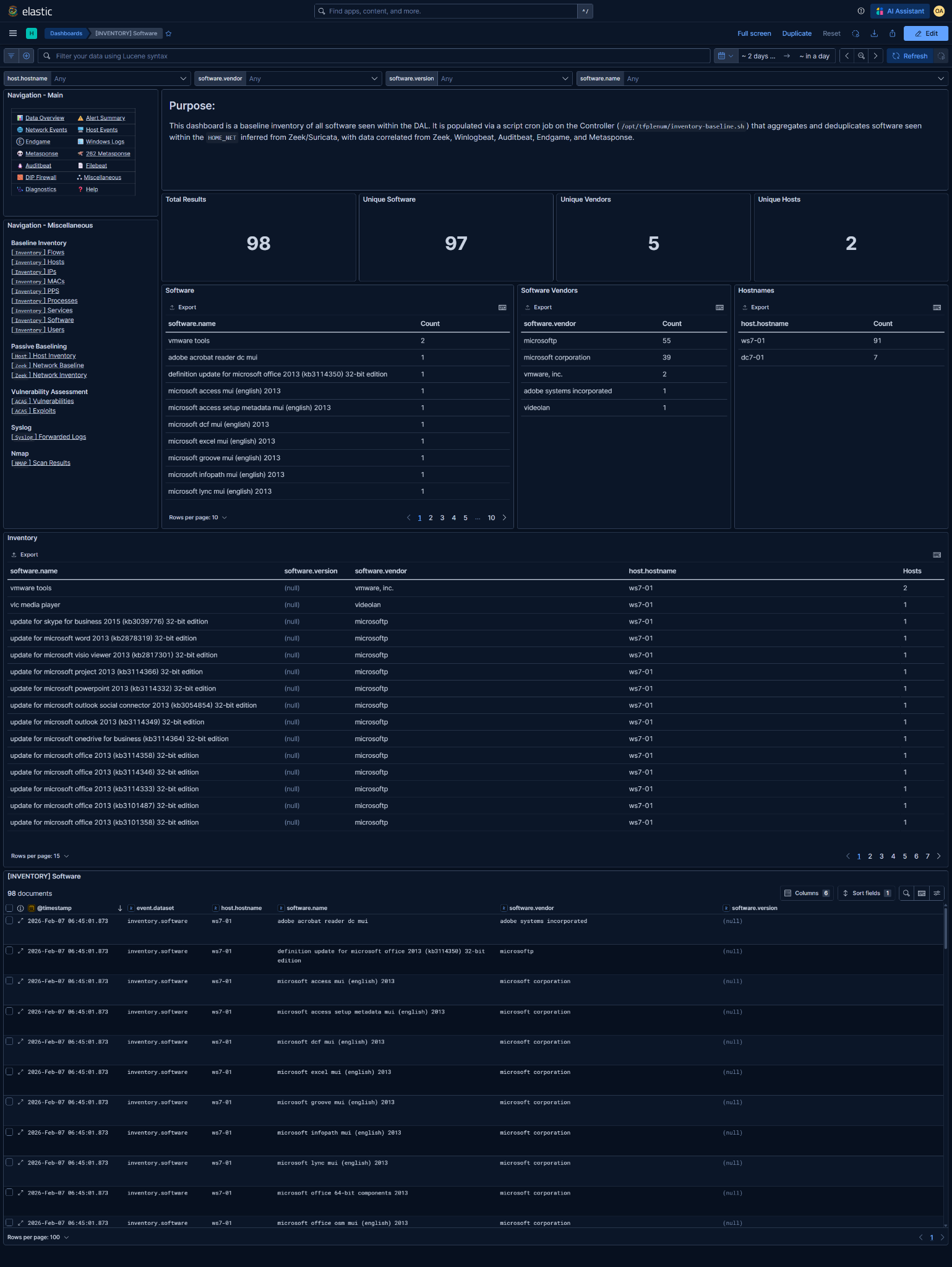
Kibana Dashboard: [INVENTORY] Software
What is this baseline?
The associated Kibana dashboard represents the baseline inventory of installed software observed within the DAL.
- A software entry consists of:
software.namesoftware.vendorsoftware.version(if reported)- One or more associated
host.hostnamevalues
- Each row answers:
"Was this software observed in the baseline inventory?"
- This is not a vulnerability or patch management system:
- No CVE or exposure assessment
- No assurance the software is currently installed
- No guarantee version data is complete or accurate
- A single corroborated observation is sufficient to add software to the baseline.
- Entries are deduplicated by this tuple:+
software.namesoftware.vendorsoftware.version(when available)
- Software entries are added when observed on hosts within the DAL
@timestampreflects when the software entry was last observed and written into the baseline
Data Prerequisites
If any of these are missing or incorrect, the baseline is unreliable.
1. DAL / HOME_NET must be correct
- Derived from Zeek and/or Suricata
HOME_NET - Used to scope which hosts to use software data from
- Incorrect DAL → missing hosts and incomplete software coverage
2. Required telemetry sources (at least one)
- Winlogbeat
- Auditbeat (
package) - Metasponse (software inventory)
- Endgame (application telemetry)
NOTE: Software visibility is dependent on host-based inventory collection.
Partial endpoint coverage will significantly reduce completeness.
Basic Analysis Workflow
1. Baseline sanity check
Validate expected software footprint:
- Core OS and enterprise software dominates
- Expected line-of-business applications are present
- Vendor distribution aligns with mission scope
- No obvious junk or placeholder entries
High software counts are normal; focus on unexpected presence, not volume.
2. Long-tail analysis (primary value)
Focus on unusual or unapproved software
- Single-host software entries
- Software from uncommon vendors
- Software without version information
- Tools that enable remote access, tunneling, or persistence
Key questions
- Approved enterprise software?
- Temporary installer or update artifact?
- Admin or mission-support tooling?
- Unauthorized or shadow IT application?
Validate against:
- Approved software lists
- Mission documentation
- Administrator confirmation if required
3. Host distribution review
Software on many hosts
- Usually enterprise-deployed packages
- Unexpected spread may indicate uncontrolled installs
Software on single hosts
- Normal for niche tools
- Suspicious if capability-enabling (e.g., RDP enhancers, tunneling tools)
Distribution context drives priority, not the name alone.
4. Export for reporting and diffing
Reporting and documentation requirements are determined by the Mission Element Lead/Crew Lead
Common exports
- Full Inventory table (CSV)
- Software ↔ host mapping
- Non-Microsoft vendor subset
NOTE: These exports represent the declared software baseline for the mission period.
5. Enable baseline deviation detection rule
Enabling too early guarantees noise - it will alert on ALL new inventory additions after enablement.
Detection rules can be managed in Kibana under Security → Rules
Rule: [262][Inventory] New software added to baseline
- Detection logic:
Alert when new software within the DAL is added to the baseline inventory
- Only enable after:
- Baseline window is complete
- Expected software is fully observed
- Long-tail software review is finished
- Ongoing alert tuning:
- Whitelist known installers and updates
- Suppress expected mission-support tooling
- Validate whether the software introduces new capability or risk
This rule is intended to catch:
- Unauthorized software installs
- Shadow IT applications